Performance Max vs Standard Shopping in 2026: When to Use Which
A complete comparison of Performance Max and Standard Shopping campaigns, a 70/30 budget split example, and a guide on when to use which in 2026.
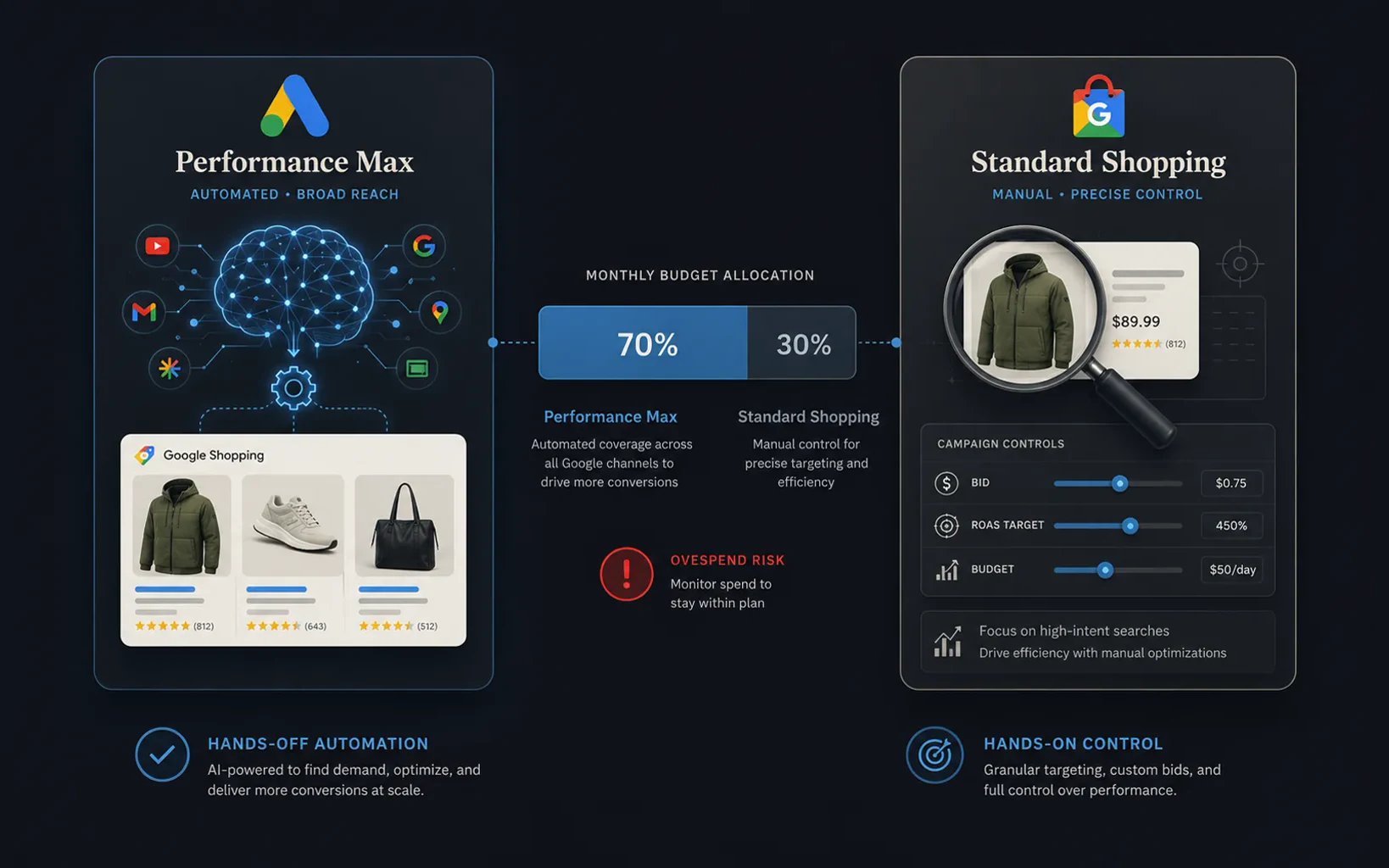
The fundamental difference in one sentence
Performance Max is an automated system that looks for buyers for your ad across all Google platforms — Search, Shopping, YouTube, Display, Discover, Gmail, and Maps — and decides on its own where to spend the budget. Standard Shopping is a manually managed campaign that displays your ads exclusively on the Shopping tab, Google search, and Google Images — where a user is actively looking to buy. PMax is a net. Standard Shopping is a precision rifle.
Comparison of key dimensions
| Dimension | Performance Max | Standard Shopping |
|---|---|---|
| Placements | All Google channels | Only Shopping / Search / Images |
| Bid control | None — AI decides | Full control per product |
| Negative keywords | Account-level only (limited) | Campaign and ad group level |
| Search terms report | Top categories only | Complete search terms report |
| Bid strategy | Max Conversions / Max Value | Manual, Enhanced CPC, Target ROAS |
| Learning phase | 4–6 weeks, min. 30–50 conversions | Faster start, works with less data |
| Creative assets | Video, images, text from asset library | Feed only — title, image, price |
| Auction priority | Always takes priority over Standard Shopping | Gets impressions when PMax doesn't bid |
When to use Standard Shopping
Standard Shopping is the right choice in four specific scenarios:
- Small budget (under €100/day) — PMax spends part of the budget on Display and YouTube where conversion rates are 2–3× lower than the Shopping tab; Standard Shopping stays focused on high-intent traffic and spends a smaller budget more efficiently
- Insufficient conversion history — PMax requires a minimum of 30–50 conversions per month for the AI to exit the learning phase; new accounts or accounts with fewer conversions will have better results with Standard Shopping
- Margin protection and SKU-level control — if you have products with different margins and want to set different ROAS targets per category, Standard Shopping provides that granularity that PMax cannot offer
- Data transparency — Standard Shopping provides a complete search terms report; if analytics and understanding buying signals are priorities, Standard Shopping is the only choice
When to use Performance Max
- Scaling beyond Shopping — when you've exhausted impression share on Standard Shopping (above 70%) and want to reach buyers who aren't yet in the active search phase, PMax opens up YouTube, Discover, and Display inventory
- Catalog above 1,000 SKUs — manual bid management on large catalogs is impractical; PMax AI handles the long tail and automatically identifies which products to push
- Strong asset library — PMax significantly outperforms Standard Shopping when you have quality video assets (9:16 for YouTube Shorts, 16:9 for pre-roll); without video, PMax behaves like a feed-only campaign with weaker reach
- Feed-only PMax configuration — if you don't upload creative assets, PMax behaves similarly to Standard Shopping but with an algorithm that can reach a 30–45% lower CPA in some accounts thanks to cross-channel optimization
70/30 budget split — a practical example
The most common hybrid structure that yields results in practice looks like this: 70% of the budget in PMax, 30% in Standard Shopping. The logic is as follows:
- PMax (70%) — drives volume, covers all channels, takes care of long-tail SKUs that aren't worth manual optimization, and scales reach beyond the Shopping tab
- Standard Shopping (30%) — covers "hero" products (top 10–20% of the catalog by revenue), protects margins on more expensive categories, and provides transparency through the search terms report that PMax doesn't give
Key rule: the same product must not be in both campaigns without isolation. PMax automatically takes priority in the auction — if a hero product is in both PMax and Standard Shopping, Standard Shopping will never get an impression. Use listing groups in Standard Shopping to exclusively include only hero SKUs, and exclude them from the PMax asset group.
"Zombie" strategy for stuck products
PMax has a known problem: concentrating the budget on 10–15% of bestsellers while the rest of the catalog practically never gets an impression. Those stuck products are called "zombies" — they are technically in the campaign but are effectively invisible.
The solution: pull the zombie SKUs out of PMax and put them into a separate Standard Shopping campaign with a Maximize Clicks bid strategy. You're not optimized for conversions — the goal is to force the system to test those products and gather initial conversion data. Once they accumulate enough data, you return them to PMax or let them run in a Standard Shopping campaign with a Target ROAS.
What the feed has to do with all this
Both PMax and Standard Shopping pull data from the same Merchant Center feed. But PMax is much more sensitive to feed quality because the AI generates dynamic copy and chooses images for different formats. A bad title in Standard Shopping reduces CTR. A bad title in PMax reduces CTR, quality score, relevance on YouTube and Discover placements simultaneously.
In practice, this means: if you plan to launch PMax, a feed audit is a prerequisite, not an option. PMax will scale both good and bad signals from the feed — and a scaled bad feed is an expensive mistake.
Preparing your account for PMax or a hybrid structure?
Check the feed before the AI scales it.
Follow this blog for future case studies and analyses.
Want this kind of result on your store?
Request a free analysis